Audiobook speed: How to find your pace and save time
The speed of an audiobook is set in the player via a control, usually a small number like “1.0×” next to the playback buttons. The math behind it is simple: Listening time = length at normal speed ÷ speed. A ten-hour audiobook therefore lasts eight hours at 1.25×, six hours and 40 minutes at 1.5× and five hours at 2×. Which speed is right depends less on the clock than on the story, the voice and the moment when you listen. In this article we show you the calculation, a lookup table and our recommendations for crime, fantasy, falling asleep and children's stories.
In short
- Formula: Length at 1× divided by the factor. Do not multiply and don't think in percentages: 1.5× does not halve the time, it saves one third.
- Time savings: 1.25× saves 20%, 1.5× about 33%, 2× exactly 50%. Each further step yields less additional gain.
- Remaining time: (Total length minus position already heard) ÷ speed.
- Good starting point: 1.1× to 1.25× for narratives, 1.0× or slower for falling asleep and for children.
- Most stick with the default: Those who adjust the speed end up mostly just above 1×.
Table of contents
- How to calculate listening time
- Table: How long does an audiobook last at which speed?
- Calculate the remaining listening time
- How to change the speed in the app or web player
- Which speed suits you?
- Falling asleep and read-aloud: When slower is better
- Listening to short stories on OutaStory
- Frequently asked questions about audiobook speed
- Sources
How to calculate listening time
Playback speed and listening time are inversely proportional. Double the speed and the time is halved. From this follow three formulas you can use for any player and any story:
- Actual listening time = length at 1× ÷ speed
- Time saved = length at 1× − actual listening time
- Time savings in percent = (1 − 1 ÷ speed) × 100
An example: An audiobook is listed as twelve hours. At 1.5× you divide 12 by 1.5 and get eight hours. You save four hours, i.e. one third.
The most common mistake is to treat the speed like a discount. “1.5× is 50% faster, so I save 50%” sounds logical but is not correct. You save 33% because the factor divides the time and does not subtract. Only at 2× is it actually 50%.
If you prefer not to calculate in your head, you can quickly find the right number with an audiobook speed calculator. Important: enter the exact speed from your player, for example 1.3×, and not the nearest rounded step.
Why going faster isn't infinitely worthwhile
Time savings don't grow evenly. Per hour of audiobook it looks like this:
- From 1× to 1.5× you save 20 minutes.
- From 1.5× to 2× you only save another 10 minutes.
- From 2× to 3× you gain about 10 minutes, even though the speed increases by half.
So the big gain is in the first steps. Going from 1× to 1.25× saves twelve minutes per hour and you hardly notice the difference while listening. Jumps beyond that require significantly more concentration for comparatively little extra time.
Table: How long does an audiobook last at which speed?
The following overview converts a ten-hour audiobook and a 20-minute short story for common speed levels. Values are rounded to whole minutes.
| Speed | Audiobook (10 hrs) | Saved | Short story (20 min) | Savings in % |
|---|---|---|---|---|
| 0,75× | 13 hrs. 20 min. | 3 hrs. 20 min. longer | 27 min. | 33% more time |
| 1,0× | 10 hrs. | – | 20 min. | 0% |
| 1,1× | 9 hrs. 5 min. | 55 min. | 18 min. | 9% |
| 1,2× | 8 hrs. 20 min. | 1 hr. 40 min. | 17 min. | 17% |
| 1,25× | 8 hrs. | 2 hrs. | 16 min. | 20% |
| 1,5× | 6 hrs. 40 min. | 3 hrs. 20 min. | 13 min. | 33% |
| 1,75× | 5 hrs. 43 min. | 4 hrs. 17 min. | 11 min. | 43% |
| 2,0× | 5 hrs. | 5 hrs. | 10 min. | 50% |
| 2,5× | 4 hrs. | 6 hrs. | 8 min. | 60% |
| 3,0× | 3 hrs. 20 min. | 6 hrs. 40 min. | 7 min. | 67% |
For a short story the differences in minutes are small. A 20-minute story fits a typical train ride exactly at 1.0×; at 1.25× you have four minutes left for changing trains. That's why many people deliberately listen to short formats at normal speed: the time saved is small and the experience of the voice remains fully preserved.
Calculate the remaining listening time
Often you don't want to know the total runtime, but only whether the rest still fits your commute home. For that, subtract the position already heard from the total length and divide the result by your speed:
Remaining time = (Total length − position heard) ÷ speed
Two examples:
- An audiobook is twelve hours, you are at hour three. Nine hours of content remain. At 1.5× you need six hours for that.
- 90 minutes of content remain, you listen in the evening at 0.75×. Then the rest takes two hours, i.e. 30 minutes longer than at normal speed.
Make sure to use the position in the audiobook and not the time you have already spent listening. If you listened to the first three hours at 1.5×, you may only have spent two hours on the clock, but the position is still at three hours. Pauses, rewinding and repeated sections are not accounted for by any formula.
Many players take this work off your hands. In a common library app you can see while listening, for example, what percentage has already been listened to and how long it will still take, directly above the cover. If your player shows the remaining time, quickly check whether it already takes the chosen speed into account.
Planning with fixed listening times
If you listen every day at a fixed time, you can divide an audiobook like a timetable. Divide the actual listening time by your daily listening duration. A ten-hour audiobook at 1.25× lasts eight hours. At 40 minutes per day you'll finish in twelve days. With short stories and serial stories it's even easier: one chapter per trip, and the story ends where your day takes a break. How long a good chapter should be for that, we collected in our article on chapter length in audiobooks.
How to change the speed in the app or web player
The controls are similar in almost all audiobook apps, podcast players and web players:
- Open the playback screen. Start the story and open the full view of the player, not the mini bar at the edge of the screen.
- Look for the speed symbol. Usually it says “1.0×” or “1×”, sometimes a tachometer icon. In a major audiobook app this small field sits at the top right of the playback screen and can be adjusted in fine steps.
- Choose a level. Depending on the player, tap fixed steps like 0.75×, 1.25× and 1.5× or drag a fine slider.
- Test listening. Listen for a minute before skipping ahead. The ear needs a moment to adapt to a new tempo.
- Check the setting. Some players remember the speed per title, others for the whole app. If the next story suddenly sounds too fast, this is usually the reason.
The range varies by application. The mentioned library app offers, according to the Stadtbibliothek Euskirchen the 0.6- to 3x speed. Other players work with a few fixed steps. A detailed step-by-step guide with typical pitfalls can be found in our article Adjusting audiobook speed.
Does the voice sound distorted at higher speeds?
Modern players usually speed up playback in a way that preserves pitch. The voice therefore becomes faster but not higher. At very high settings breathing sounds and pauses can still seem rushed. If a voice sounds unnatural at 1.5×, it is usually not a technical issue but that this speed doesn't suit the speaking style. In that case it's worth stepping back one level.
Which speed suits you?
The honest answer: There is no universally right speed. But there are a few clear patterns.
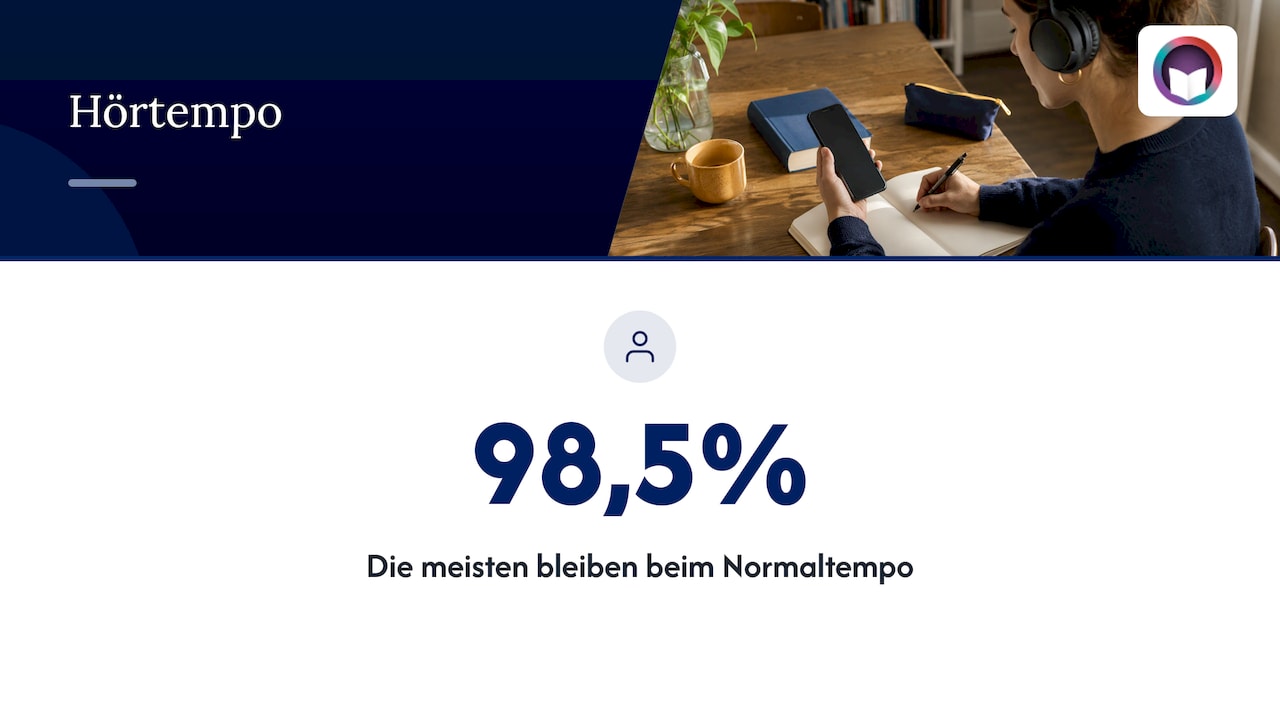
Most people don't change the speed at all. According to data a large streaming service made available for podcasts in November 2023, 98.5% of listeners stayed at 1.0×. The next most popular step was 1.2×, only a tiny portion tried 2×. The author of the article recommends 1.2× herself because it is hardly noticeably faster but feels livelier.
Studies with accelerated lecture videos also suggest that moderate increases hardly impair comprehension, while very high settings do. For stories this means: the more you want to take in mood, pauses and nuances, the closer you should stay to normal speed.
Our rules of thumb by situation
| Situation | Recommended speed | Why |
|---|---|---|
| Krimi und Thriller mit vielen Hinweisen | 1,0× bis 1,2× | Details und Wendungen gehen bei hohem Tempo leicht verloren |
| Fantasy, Romantasy, Science-Fiction mit eigenen Namen und Welten | 1,0× bis 1,15× | Neue Begriffe brauchen einen Moment, bis sie sitzen |
| Bekannte Geschichte zum zweiten Mal | 1,25× bis 1,5× | Du kennst die Handlung und suchst nur Details |
| Pendeln, Hausarbeit, Sport | 1,1× bis 1,3× | Ein etwas zügigeres Tempo hält die Aufmerksamkeit |
| Einschlafen | 0,85× bis 1,0× | Ruhigeres Tempo, mehr Raum zwischen den Sätzen |
| Hören in einer Fremdsprache | ab 1,0×, langsam steigern | Erst verstehen, dann beschleunigen |
| Kindergeschichten | 1,0× oder langsamer | Kinder brauchen Zeit für Bilder im Kopf |
The voice also matters
Not every narrator reads at the same base speed. A calm, measured voice often tolerates 1.2× without problems, while an already brisk narrator can sound rushed at 1.1×. A good test: if you start repeating sentences in your head while listening, the speed is too high. If your thoughts drift away, it may be fine to go a bit faster.
At OutaStory you hear stories either with professionally produced voices or with the author’s own voice. Especially with author narration normal speed is worth it: emphasis, pauses and laughter in the right place are part of what the story tells.
Increase slowly instead of jumping
If you want to listen faster, proceed in small steps. Start at 1.1× and stay with it for a few days. If it feels normal, go to 1.2× or 1.25×. After a while the new speed will feel like the standard and the old one will suddenly sound slow. If you jump directly to 2×, you will quickly lose the thread and with it the enjoyment of the story.
Falling asleep and read-aloud: When slower is better
Different rules apply in the evening. If you want to fall asleep to a story you are not looking for time savings but a calm rhythm. A slightly slower setting like 0.9× makes the voice softer and gives the mind more room to switch off. Combined with a sleep timer, if your player has one, the story ends before you wake up and have to search for the chapter.
For children the speed is even more important. Bedtime stories, animal adventures and first rhymes rely on children having time to imagine the scene, ask questions and join in the rhymes. Play such stories at normal speed or slightly slowed down, especially for younger children. If you also read aloud yourself, there are helpful criteria to choose the right read-aloud book: length, language and illustrations should match the age and attention span. The same criteria help you find the right audio story and the right speed.
A trick that works well when listening together: let older children follow the text while the voice reads. How we implemented synchronized reading on our site is described in the article Audio grows up: synchronized reading and seamless playback. When following along, the speed adjusts very naturally: anyone reading immediately notices if the voice is too fast.
Listening to short stories on OutaStory
Not every story needs ten hours. Our short stories fit into a train ride, a lunch break or the last minutes before falling asleep, and you can read each of them for free or play them as audiobooks. The range spans fantasy, romantasy and science fiction to crime, thriller and horror and our children's section. Serial stories are published chapter by chapter so you move forward exactly one piece each day.

If you listen a lot on the go, take a look at OutaStory Premium: unlimited listening, ad-free use and offline stories, even where the network drops out. To get started try, for example, The library where the books talk back at night for a quiet evening or the mystery title Under Suspicion, where you should take every detail at normal speed. Your world, your stories: write, read, listen.
Frequently asked questions about audiobook speed
How long is an audiobook?
That depends on the text and the speaking style. Novels often last many hours, short stories rather ten to 40 minutes. The indicated length always refers to normal speed 1×. For your actual listening time divide it by the set speed.
Does 1.5× save half the time?
No. At 1.5× you save one third: ten hours become six hours and 40 minutes. You only save half at 2×. The factor divides the time, it doesn't subtract a percentage.
What is the difference between an audiobook and a radio play?
In an audiobook a voice, sometimes several, reads a text aloud, usually close to the printed version. A radio play is its own production with distributed roles, sound effects and music. In radio plays a higher speed often sounds more unnatural because music and effects are sped up as well.
In which format are audiobooks available?
Audiobooks are available as downloads, for example in MP3 format, or as streams directly in the app or browser. Both variants can be sped up in most players. Which form fits your everyday life is explained in the comparison MP3 or Streaming, and the advantages of offline listening in everyday life and while traveling are covered in a separate article.
Which speed is sensible for beginners?
Start at 1.0× and try 1.1× or 1.2× after a few stories. These steps save noticeable time and hardly change the listening experience. Only increase further when the new speed feels completely normal.
Sources
Stadtbibliothek Euskirchen: Audiobook tips for the library app Business Insider: The Best Speed for Podcasts Is 1.2X Tutonaut: Ten practical tips for audiobooks KeenCalculator: Audiobook speed calculator Astor: Choosing the Right Book for Read-Aloud
Recommendations
Read and write on OutaStory
Thousands of short stories to read for free — or publish your own and find an audience.